2019 Mitsubishi Eclipse Cross Reviews, Pricing & Specs
Write a review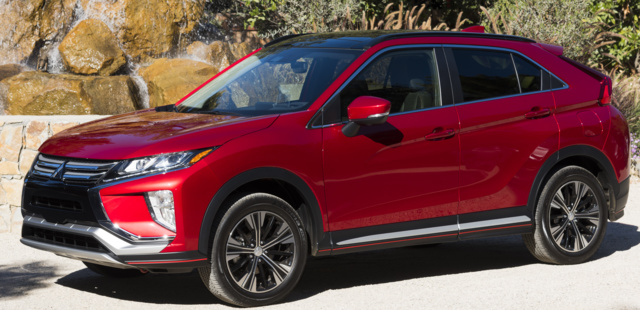
Those who remember the sporty Eclipse of the 1990s may be confused by the similarly named Eclipse Cross. Introduced in 2017, the Eclipse Cross is a compact crossover based, in part, on the Outlander platform -- yet it doesn’t have anything in common with the little Eclipses of old, other than a badge and a name. Since it’s such a new model, the Eclipse Cross goes into 2019 with no changes other than gloss black window switch panels and a new accessory roof rail for all trims.
A 1.5-liter turbocharged four-cylinder powers the Eclipse Cross. It makes 152 horsepower and 184 pound-feet of torque. Reportedly, the engine is quick, but don’t expect to win any drag races. Front-wheel drive (FWD) comes standard while an all-wheel drive (AWD) system, which only drives the front wheels in most situations to improve fuel economy, is an available option. The Eclipse Cross offers a continuously variable transmission (CVT). A FWD Eclipse Cross manages 25 mpg city, 28 highway, and 26 combined, while AWD drops mileage slightly, to 25 mpg city, 26 mpg highway, and 25 combined.
Given its low price, the Eclipse Cross offers basic features. The base ES model gets cloth upholstery, a USB port, Bluetooth compatibility, a 7.0-inch infotainment touchscreen, and climate control. The LE model adds Apple CarPlay, Android Auto, and an extra USB port. Eclipse Cross SE models offer cloth seats, which are heated in the front, a better stereo, and blind-spot monitors. The SEL trim gets a power driver’s seat, surround-view camera, and head-up display – plus, it opens up available options like a dual-pane sunroof, heated rear seats, heated steering wheel, and additional active safety features. Room inside is adequate, and the second row can slide up to eight inches in either direction. As for carrying capacity, 22 cubic feet of storage is available with the seats up; when the seats are down, storage increases to 48 cubic feet.
A reversing camera comes standard for the 2019 Eclipse Cross, while other desirable safety features like blind-spot monitors, forward-collision warning with automatic emergency braking, lane-departure warning, and adaptive cruise control cost extra. The Eclipse Cross is a typical representation of the rest of the Mitsubishi range. It has an attractive price, a main reason most people would choose to buy one over countless other compact crossovers on the market today. However, fans of Mitsubishi’s image-boosting performance cars may be left disappointed.
User reviews for 2019 Mitsubishi Eclipse Cross
Write a review2019 Mitsubishi Eclipse Cross Pricing
Trims & specs
Air Conditioning
Automatic climate control front air conditioning · Single front air conditioning zones
Airbags
Dual front airbags · Driver knee airbags · Passenger airbag deactivation: occupant sensing deactivation · Front side airbags · Front side curtain airbags
Audio System
Antenna Type: mast · USB auxiliary audio input · Touch screen display radio · Total Number of Speakers: 4
Brakes
ABS: 4-wheel · Braking assist: hill start assist · Front brake diameter: 11.6 · Front brakes: ventilated disc · Rear brake diameter: 11.9 · Rear brakes: disc
Comfort Features
Floor Mat Material: carpet · Floor Material: carpet · Floor Mats: front · Shift knob trim: urethane · Steering wheel trim: urethane
Convenience Features
Assist handle: rear · Center console: front console with armrest and storage · Cupholders: rear · Multi-function remote: keyless entry with panic alarm · One-touch windows: 1 · Power outlet(s): 12V front · Power steering: electric · Power windows: lockout button · Reading lights: front · Rear power outlet: 12V · Steering wheel: tilt and telescopic · Steering wheel mounted controls: multi-function screen controls · Storage: door pockets · Vanity mirrors: dual
Driver Seat
Manual adjustments: 6
Drivetrain
Axle ratio: 6.39
Engine
Alternator: 130 amps
Exterior Features
Door handle color: body-color · Fender lip moldings: black · Front bumper color: body-color · Grille color: black with chrome accents · Mirror color: body-color · Rear bumper color: body-color · Rear spoiler: roofline spoiler · Rear spoiler color: body-color · Rear trunk/liftgate: liftgate · Rocker panel color: black · Window trim: chrome
Headrests
Front headrests: adjustable · Number of front headrests: 2 · Number of rear headrests: 3
In Car Entertainment
Infotainment: Fuse · Infotainment screen size: 7 in.
Instrumentation
Fuel economy display: range · Instrument cluster screen size: 4.2 in. · Warnings and reminders: maintenance reminder
Lights
Daytime running lights: LED · Headlights: Halogen · Tail and brake lights: LED
Mirrors
Exterior mirrors: heated · Inside rearview mirror: manual day/night
Passenger Seat
Manual Adjustments: 4
Rear Seats
Type: 60-40 split bench
Safety
Camera system: rearview · Child seat anchors: LATCH system · Crumple zones: rear · Rearview monitor: in dash
Seatbelts
Emergency locking retractors: front and rear · Front seatbelts: 3-point · Seatbelt force limiters: front · Seatbelt pretensioners: front · Seatbelt warning sensor: driver and passenger · Second row seatbelts: 3-point
Seats
Driver seat manual adjustments: height · Front seat type: bucket · Passenger seat manual adjustments: reclining · Rear headrests: adjustable · Rear seat folding: split · Rear seat manual adjustments: reclining · Upholstery: cloth
Security
Power door locks: anti-lockout
Spare Tire
Mount Location: inside · Size: temporary
Spare Wheel
Rim Type: steel
Steering
Steering ratio: 14.7 · Turns lock-to-lock: 2.90
Suspension
Front Arm Type: lower control arms · Front Shock Type: gas shock absorbers · Front Spring Type: coil springs · Front Suspension Classification: independent · Front Suspension Type: MacPherson struts · Rear Shock Type: gas shock absorbers · Rear Spring Type: coil springs · Rear Suspension Classification: independent · Rear Suspension Type: multi-link · Stabilizer bar(s): rear
Telematics
Electronic messaging assistance: with voice recognition · Phone: hands free · Phone wireless data link: Bluetooth
Tires
Type: all season
Tires and Rims
Wheel type: aluminum alloy
Windows
Front wipers: variable intermittent · Liftgate window: fixed · Power windows: with safety reverse · Rear wiper: intermittent
Air Conditioning
Automatic climate control front air conditioning · Single front air conditioning zones
Airbags
Dual front airbags · Driver knee airbags · Passenger airbag deactivation: occupant sensing deactivation · Front side airbags · Front side curtain airbags
Audio System
Antenna Type: mast · Bluetooth auxiliary audio input · Touch screen display radio · Total Number of Speakers: 4
Brakes
ABS: 4-wheel · Braking assist: hill start assist · Front brake diameter: 11.6 · Front brakes: ventilated disc · Rear brake diameter: 11.9 · Rear brakes: disc
Comfort Features
Floor Mat Material: carpet · Floor Material: carpet · Floor Mats: front · Shift knob trim: urethane · Steering wheel trim: urethane
Convenience Features
Assist handle: rear · Center console: front console with armrest and storage · Cupholders: rear · Multi-function remote: keyless entry with panic alarm · One-touch windows: 1 · Power outlet(s): 12V front · Power steering: electric · Power windows: lockout button · Reading lights: front · Rear power outlet: 12V · Steering wheel: tilt and telescopic · Steering wheel mounted controls: cruise controls · Storage: accessory hook · Vanity mirrors: dual
Driver Seat
Manual adjustments: 6
Drivetrain
4WD Type: on demand · Axle ratio: 6.39
Engine
Alternator: 130 amps
Exterior Features
Door handle color: body-color · Fender lip moldings: black · Front bumper color: body-color · Grille color: black with chrome accents · Mirror color: body-color · Rear bumper color: body-color · Rear spoiler: roofline spoiler · Rear spoiler color: body-color · Rear trunk/liftgate: liftgate · Rocker panel color: black · Window trim: chrome
Headrests
Front headrests: adjustable · Number of front headrests: 2 · Number of rear headrests: 3
In Car Entertainment
Infotainment: Fuse · Infotainment screen size: 7 in.
Instrumentation
Fuel economy display: MPG · Instrument cluster screen size: 4.2 in. · Warnings and reminders: maintenance reminder
Lights
Daytime running lights: LED · Headlights: Halogen · Tail and brake lights: LED
Mirrors
Exterior mirrors: power · Inside rearview mirror: manual day/night
Passenger Seat
Manual Adjustments: 4
Rear Seats
Type: 60-40 split bench
Safety
Camera system: rearview · Child seat anchors: LATCH system · Crumple zones: rear · Rearview monitor: in dash
Seatbelts
Emergency locking retractors: front and rear · Front seatbelts: 3-point · Seatbelt force limiters: front · Seatbelt pretensioners: front · Seatbelt warning sensor: driver and passenger · Second row seatbelts: 3-point
Seats
Driver seat manual adjustments: reclining · Front seat type: bucket · Passenger seat manual adjustments: reclining · Rear headrests: adjustable · Rear seat folding: split · Rear seat manual adjustments: reclining · Upholstery: cloth
Security
Power door locks: anti-lockout
Spare Tire
Mount Location: inside · Size: temporary
Spare Wheel
Rim Type: steel
Steering
Steering ratio: 14.6 · Turns lock-to-lock: 2.90
Suspension
Front Arm Type: lower control arms · Front Shock Type: gas shock absorbers · Front Spring Type: coil springs · Front Suspension Classification: independent · Front Suspension Type: MacPherson struts · Rear Shock Type: gas shock absorbers · Rear Spring Type: coil springs · Rear Suspension Classification: independent · Rear Suspension Type: multi-link · Stabilizer bar(s): rear
Telematics
Electronic messaging assistance: with voice recognition · Phone: hands free · Phone wireless data link: Bluetooth
Tires
Type: all season
Tires and Rims
Wheel type: aluminum alloy
Windows
Front wipers: variable intermittent · Liftgate window: fixed · Power windows: with safety reverse · Rear wiper: intermittent
Air Conditioning
Automatic climate control front air conditioning · Single front air conditioning zones
Airbags
Dual front airbags · Driver knee airbags · Passenger airbag deactivation: occupant sensing deactivation · Front side airbags · Front side curtain airbags
Audio System
Antenna Type: mast · Voice recognition audio system · USB auxiliary audio input · AM/FM radio · Satellite Radio: SiriusXM · Total Number of Speakers: 4
Brakes
ABS: 4-wheel · Braking assist: hill start assist · Front brake diameter: 11.6 · Front brakes: ventilated disc · Rear brake diameter: 11.9 · Rear brakes: disc
Comfort Features
Floor Mat Material: carpet · Floor Material: carpet · Floor Mats: front · Shift knob trim: urethane · Steering wheel trim: urethane
Convenience Features
Assist handle: front · Center console: front console with armrest and storage · Console Insert: organizer tray · Cupholders: illuminated · Multi-function remote: keyless entry with panic alarm · One-touch windows: 1 · Power outlet(s): 12V front · Power steering: electric · Power windows: lockout button · Reading lights: front · Rear power outlet: 12V · Steering wheel: tilt and telescopic · Steering wheel mounted controls: audio · Storage: accessory hook · Vanity mirrors: dual
Driver Seat
Manual adjustments: 6
Drivetrain
4WD Type: on demand · Axle ratio: 6.39
Engine
Alternator: 130 amps
Exterior Features
Door handle color: body-color · Fender lip moldings: black · Front bumper color: body-color · Grille color: black with chrome accents · Mirror color: black · Rear bumper color: body-color · Rear spoiler: roofline spoiler · Rear spoiler color: body-color · Rear trunk/liftgate: liftgate · Rocker panel color: black · Window trim: chrome
Headrests
Front headrests: adjustable · Number of front headrests: 2 · Number of rear headrests: 3
In Car Entertainment
Connected in-car apps: Google search · Infotainment: Fuse · Infotainment screen size: 7 in.
Instrumentation
Fuel economy display: range · Instrument cluster screen size: 4.2 in. · Warnings and reminders: low fuel level
Lights
Daytime running lights: LED · Headlights: Halogen · Tail and brake lights: LED
Mirrors
Exterior mirrors: integrated turn signals · Inside rearview mirror: manual day/night
Passenger Seat
Manual Adjustments: 4
Rear Seats
Type: 60-40 split bench
Safety
Camera system: rearview · Child seat anchors: LATCH system · Crumple zones: front · Rearview monitor: in dash
Seatbelts
Emergency locking retractors: front · Front seatbelts: 3-point · Seatbelt force limiters: front · Seatbelt pretensioners: front · Seatbelt warning sensor: driver and passenger · Second row seatbelts: 3-point
Seats
Driver seat manual adjustments: reclining · Front seat type: bucket · Passenger seat manual adjustments: reclining · Rear headrests: adjustable · Rear seat folding: split · Rear seat manual adjustments: reclining · Upholstery: cloth
Security
Power door locks: anti-lockout
Spare Tire
Mount Location: inside · Size: temporary
Spare Wheel
Rim Type: steel
Steering
Steering ratio: 14.6 · Turns lock-to-lock: 2.90
Suspension
Front Arm Type: lower control arms · Front Shock Type: gas shock absorbers · Front Spring Type: coil springs · Front Suspension Classification: independent · Front Suspension Type: MacPherson struts · Rear Shock Type: gas shock absorbers · Rear Spring Type: coil springs · Rear Suspension Classification: independent · Rear Suspension Type: multi-link · Stabilizer bar(s): front
Telematics
Electronic messaging assistance: with read function · Phone: voice activated · Phone wireless data link: Bluetooth
Tires
Type: all season
Tires and Rims
Wheels: painted aluminum
Windows
Front wipers: variable intermittent · Liftgate window: fixed · Power windows: with safety reverse · Rear wiper: with washer
Air Conditioning
Automatic climate control front air conditioning · Single front air conditioning zones
Airbags
Dual front airbags · Driver knee airbags · Passenger airbag deactivation: occupant sensing deactivation · Front side airbags · Front side curtain airbags
Audio System
Antenna Type: diversity · Voice recognition audio system · Bluetooth auxiliary audio input · Touch screen display radio · Satellite Radio: SiriusXM · Total Number of Speakers: 4
Brakes
ABS: 4-wheel · Braking assist: hill start assist · Front brake diameter: 11.6 · Front brakes: ventilated disc · Rear brake diameter: 11.9 · Rear brakes: disc
Comfort Features
Floor Mat Material: carpet · Floor Material: carpet · Floor Mats: front · Shift knob trim: urethane · Steering wheel trim: urethane
Convenience Features
Assist handle: rear · Center console: front console with armrest and storage · Console Insert: organizer tray · Cupholders: front · Multi-function remote: keyless entry · One-touch windows: 1 · Power outlet(s): 12V front · Power steering: electric · Power windows: lockout button · Reading lights: front · Rear power outlet: 12V · Steering wheel: tilt and telescopic · Steering wheel mounted controls: cruise controls · Storage: front seatback · Vanity mirrors: dual
Driver Seat
Manual adjustments: 6
Drivetrain
4WD Type: on demand · Axle ratio: 6.39
Engine
Alternator: 130 amps
Exterior Features
Door handle color: body-color · Fender lip moldings: black · Front bumper color: body-color · Grille color: black with chrome accents · Mirror color: black · Rear bumper color: body-color · Rear spoiler: roofline spoiler · Rear spoiler color: body-color · Rear trunk/liftgate: liftgate · Rocker panel color: black · Window trim: chrome
Headrests
Front headrests: adjustable · Number of front headrests: 2 · Number of rear headrests: 3
In Car Entertainment
Connected in-car apps: Google search · Infotainment: Android Auto ready · Infotainment screen size: 7 in.
Instrumentation
Fuel economy display: range · Instrument cluster screen size: 4.2 in. · Warnings and reminders: low oil pressure
Lights
Daytime running lights: LED · Headlights: Halogen · Tail and brake lights: LED
Mirrors
Exterior mirrors: power · Inside rearview mirror: manual day/night
Passenger Seat
Manual Adjustments: 4
Rear Seats
Type: 60-40 split bench
Safety
Camera system: rearview · Child seat anchors: LATCH system · Crumple zones: front · Rearview monitor: in dash
Seatbelts
Emergency locking retractors: front · Front seatbelts: 3-point · Seatbelt force limiters: front · Seatbelt pretensioners: front · Seatbelt warning sensor: driver and passenger · Second row seatbelts: 3-point
Seats
Driver seat manual adjustments: height · Front seat type: bucket · Passenger seat manual adjustments: reclining · Rear headrests: adjustable · Rear seat folding: split · Rear seat manual adjustments: reclining · Upholstery: cloth
Security
Power door locks: anti-lockout
Spare Tire
Mount Location: inside · Size: temporary
Spare Wheel
Rim Type: steel
Steering
Steering ratio: 14.6 · Turns lock-to-lock: 2.90
Suspension
Front Arm Type: lower control arms · Front Shock Type: gas shock absorbers · Front Spring Type: coil springs · Front Suspension Classification: independent · Front Suspension Type: MacPherson struts · Rear Shock Type: gas shock absorbers · Rear Spring Type: coil springs · Rear Suspension Classification: independent · Rear Suspension Type: multi-link · Stabilizer bar(s): front
Telematics
Electronic messaging assistance: with voice recognition · Phone: voice activated · Phone wireless data link: Bluetooth
Tires
Type: all season
Tires and Rims
Wheels: painted aluminum
Windows
Front wipers: variable intermittent · Liftgate window: fixed · Power windows: with safety reverse · Rear wiper: intermittent
Air Conditioning
Automatic climate control front air conditioning · Dual front air conditioning zones
Airbags
Dual front airbags · Driver knee airbags · Passenger airbag deactivation: occupant sensing deactivation · Front side airbags · Rear side curtain airbags
Audio System
Antenna Type: diversity · Voice recognition audio system · Bluetooth auxiliary audio input · TuneIn internet radio · Internet radio app: Spotify · Touch screen display radio · Satellite Radio: SiriusXM · Total Number of Speakers: 6
Brakes
ABS: 4-wheel · Braking assist: hill start assist · Electronic parking brake: auto off · Front brake diameter: 11.6 · Front brakes: ventilated disc · Rear brake diameter: 11.9 · Rear brakes: disc
Comfort Features
Armrests: rear center with cupholders · Floor Mat Material: carpet · Floor Material: carpet · Floor Mats: front · Shift knob trim: leather · Steering wheel trim: leather
Convenience Features
Assist handle: front · Center console: front console with armrest and storage · Console Insert: organizer tray · Cupholders: front · Multi-function remote: proximity entry system · One-touch windows: 1 · Power outlet(s): 12V front · Power steering: electric · Power windows: lockout button · Reading lights: front · Rear power outlet: 12V · Steering wheel: tilt and telescopic · Steering wheel mounted controls: phone · Storage: door pockets · Vanity mirrors: dual illuminating
Driver Seat
Manual adjustments: 6
Drivetrain
4WD Type: on demand · Axle ratio: 6.39
Engine
Alternator: 130 amps
Exterior Features
Door handle color: body-color · Fender lip moldings: black · Front bumper color: body-color · Grille color: chrome · Mirror color: body-color · Rear bumper color: body-color · Rear spoiler: roofline spoiler · Rear spoiler color: body-color · Rear trunk/liftgate: liftgate · Rocker panel color: black · Window trim: chrome
Headrests
Front headrests: adjustable · Number of front headrests: 2 · Number of rear headrests: 3
In Car Entertainment
Connected in-car apps: Google search · Infotainment: Android Auto ready · Infotainment screen size: 7 in.
Instrumentation
Fuel economy display: range · Instrument cluster screen size: 4.2 in. · Warnings and reminders: low fuel level
Lights
Daytime running lights: LED · Headlights: Auto on/off · Tail and brake lights: LED
Mirrors
Exterior mirrors: power · Inside rearview mirror: manual day/night
Passenger Seat
Manual Adjustments: 4
Rear Seats
Type: 60-40 split bench
Safety
Camera system: rearview · Child seat anchors: LATCH system · Cross Traffic Alert: rear · Crumple zones: rear · Rearview monitor: in dash
Seatbelts
Emergency locking retractors: front and rear · Front seatbelts: 3-point · Seatbelt force limiters: front · Seatbelt pretensioners: front · Seatbelt warning sensor: driver and passenger · Second row seatbelts: 3-point
Seats
Driver seat manual adjustments: reclining · Front seat type: bucket · Passenger seat manual adjustments: reclining · Rear headrests: adjustable · Rear seat folding: split · Rear seat manual adjustments: reclining · Upholstery: contrast stitching
Security
Power door locks: anti-lockout
Spare Tire
Mount Location: inside · Size: temporary
Spare Wheel
Rim Type: steel
Steering
Steering ratio: 14.6 · Turns lock-to-lock: 2.90
Suspension
Front Arm Type: lower control arms · Front Shock Type: gas shock absorbers · Front Spring Type: coil springs · Front Suspension Classification: independent · Front Suspension Type: MacPherson struts · Rear Shock Type: gas shock absorbers · Rear Spring Type: coil springs · Rear Suspension Classification: independent · Rear Suspension Type: multi-link · Stabilizer bar(s): rear
Telematics
Driver assistance app: roadside assistance · Electronic messaging assistance: with read function · Phone: voice activated · Phone wireless data link: Bluetooth · Satellite communications: Mitsubishi Connect · Smart device app compatibility: My Mitsubishi Connect · Smart device app function: horn/light operation
Tires
Type: all season
Tires and Rims
Wheel type: aluminum alloy
Windows
Front wipers: speed sensitive · Liftgate window: fixed · Power windows: with safety reverse · Rear wiper: with washer
Air Conditioning
Automatic climate control front air conditioning · Dual front air conditioning zones
Airbags
Dual front airbags · Driver knee airbags · Passenger airbag deactivation: occupant sensing deactivation · Front side airbags · Rear side curtain airbags
Audio System
Antenna Type: mast · Voice recognition audio system · USB auxiliary audio input · Stitcher internet radio · Internet radio app: Spotify · HD radio · Satellite Radio: SiriusXM · Total Number of Speakers: 6
Brakes
ABS: 4-wheel · Braking assist: hill start assist · Electronic parking brake: auto off · Front brake diameter: 11.6 · Front brakes: ventilated disc · Rear brake diameter: 11.9 · Rear brakes: disc
Comfort Features
Armrests: rear center with cupholders · Floor Mat Material: carpet · Floor Material: carpet · Floor Mats: front · Shift knob trim: leather · Steering wheel trim: leather
Convenience Features
Assist handle: front · Center console: front console with armrest and storage · Console Insert: organizer tray · Cupholders: rear · Multi-function remote: proximity entry system · One-touch windows: 1 · Power outlet(s): 12V front · Power steering: electric · Power windows: lockout button · Reading lights: front · Rear power outlet: 12V · Steering wheel: tilt and telescopic · Steering wheel mounted controls: paddle shifter · Storage: door pockets · Vanity mirrors: dual illuminating
Driver Seat
Power adjustments: 8
Drivetrain
4WD Type: on demand · Axle ratio: 6.39
Engine
Alternator: 130 amps
Exterior Features
Door handle color: body-color · Fender lip moldings: black · Front bumper color: body-color · Grille color: chrome · Mirror color: body-color · Rear bumper color: body-color · Rear spoiler: roofline spoiler · Rear spoiler color: body-color · Rear trunk/liftgate: liftgate · Rocker panel color: black · Window trim: chrome
Headrests
Front headrests: adjustable · Number of front headrests: 2 · Number of rear headrests: 3
In Car Entertainment
Connected in-car apps: Google POIs · Infotainment: Android Auto ready · Infotainment screen size: 7 in.
Instrumentation
Fuel economy display: MPG · Instrument cluster screen size: 4.2 in. · Warnings and reminders: maintenance reminder
Lights
Daytime running lights: LED · Headlights: Auto on/off · Tail and brake lights: LED
Mirrors
Exterior mirrors: integrated turn signals · Inside rearview mirror: manual day/night
Passenger Seat
Manual Adjustments: 4
Rear Seats
Type: 60-40 split bench
Safety
Camera system: surround view · Child seat anchors: LATCH system · Cross Traffic Alert: rear · Crumple zones: rear · Rearview monitor: in dash
Seatbelts
Emergency locking retractors: front and rear · Front seatbelts: 3-point · Seatbelt force limiters: front · Seatbelt pretensioners: front · Seatbelt warning sensor: driver and passenger · Second row seatbelts: 3-point
Seats
Driver seat power adjustments: height · Front seat type: bucket · Passenger seat manual adjustments: reclining · Rear headrests: adjustable · Rear seat folding: split · Rear seat manual adjustments: reclining · Upholstery: leather
Security
Power door locks: anti-lockout
Spare Tire
Mount Location: inside · Size: temporary
Spare Wheel
Rim Type: steel
Steering
Steering ratio: 14.6 · Turns lock-to-lock: 2.90
Suspension
Front Arm Type: lower control arms · Front Shock Type: gas shock absorbers · Front Spring Type: coil springs · Front Suspension Classification: independent · Front Suspension Type: MacPherson struts · Rear Shock Type: gas shock absorbers · Rear Spring Type: coil springs · Rear Suspension Classification: independent · Rear Suspension Type: multi-link · Stabilizer bar(s): rear
Telematics
Driver assistance app: roadside assistance · Electronic messaging assistance: with read function · Phone: voice activated · Phone wireless data link: Bluetooth · Satellite communications: Mitsubishi Connect · Smart device app compatibility: My Mitsubishi Connect · Smart device app function: vehicle location
Tires
Type: all season
Tires and Rims
Wheel type: aluminum alloy
Windows
Front wipers: rain sensing · Liftgate window: fixed · Power windows: with safety reverse · Rear wiper: with washer

